Source: Photo by Hal GatewoodonUnsplash
Hello. This is Wadiz FE Development Team.
We would like to share our experiences and the technologies we used while working on performance improvements for the funding detail page over the past year. We hope this will be helpful to those facing similar challenges.
Funding Details Page
Before we begin, I’ll briefly explain the funding details page, which we’ve optimized to help you better understand the process.
The funding details page is designed to showcase projects based on the creator’s innovative ideas. It serves as a platform for engaging with supporters who seek value-driven investments through the brand’s philosophy and product stories.

Funding Details Page
Over time, many features were added to the product detail page, which plays a crucial role. As a result, its loading speed gradually slowed down. I’ve always been interested in performance optimization, so I proposed to the team that we improve the product detail page, and I’ve been working on this project since early last year.
Identified areas for improvement
Out of curiosity about just how slow the funding details page really was, I used Google Analytics (GA) and WebPageTest to measure its performance.

Funding page load time

Funding Page Metrics
Our measurements showed that the funding detail page was taking an average of about 10 seconds to load.😖 In particular, we found that image loading accounted for the majority of the page’s loading time. Wondering, “Is there a way to improve this?” we set out to identify the cause of the long loading time.
Identifying the cause
The story section on the product detail page, which showcases the product, was downloading the entire section rather than just the images visible on the screen when the page loaded. This was causing longer loading times. We believed this could negatively impact service quality and the user experience.

Image Download Screen
Performance Improvements
We've got a plan. Let's download only the images needed for the visible screen! In other words, let's use lazy loading for the images!
Implementing image lazy loading on the funding details page
Before introducing the improvements, I’ll briefly explain the concept of image lazy loading. This refers to a technique where images on a page are loaded only when they need to be displayed on the screen. Lazy loading allows you to reduce the number of unnecessary images. By minimizing the number of images downloaded over the network, you can lower costs.

Loading while the image is loading
Image lazy loading technology can be implemented in three ways.
- Lazy Loading Using Browser Events: Loading Using the scroll, resize, and orientationchange Events
- By retrieving a URL value for the `data-src` attribute of an image tag and inserting it into the `src` attribute, the image itself is loaded lazily.
- Lazy Loading Using Browser APIs: Load images when they enter the viewport using the Intersection Observer API
- Lazy Loading Using Google Native: The Chrome browser automatically loads img and iframe tags when they are within the viewport
For the funding details page, we opted for a lazy-loading technique that utilizes browser events, as it is easier to support older browsers. We used the lazysizes library, which is the most widely used for this purpose.
# 개선 전
<img src="https://www.sample.png" />
# 개선 후
<img data-src="https://www.sample.png" src="https://www.sample.png" />
Preventing Content Reflow
Before introducing the improvements, I’d like to explain content reflow.

Since the browser does not have space allocated for the content until the image loads, it appears as 0x0 pixels. Once the image loads, the browser resizes the content area to fit the image's dimensions. This is called content reflow.
We conducted usability tests after implementing lazy loading technology. On the funding details page, since the image height wasn’t specified during loading, the content area would resize when users scrolled quickly. This caused the scroll position to jump suddenly or the page to stutter. To address this, we implemented a content reflow prevention feature, which specifies the content height before images load.
The changes made to the funding details page are as follows.
- When generating HTML, add the actual width and height values of image tags as data attributes (data-width, data-height)
- Specify the image height (padding) using the width and height values in the data attribute of the image tag when the page loads
# 개선 전
<img data-src="https://www.sample.png" />
# 개선 후
<img data-src="https://www.sample.png"
data-width="800"
data-height="450"
style="padding-bottom: 56.25%"
/>
# javascript
const image = document.querySelector('img[data-src]');
image.style.setProperty('padding-bottom', (100 / (width / height)) + '%');
Preloading images beyond the visible screen area
I had barely finished developing the lazy loading feature and was feeling a sense of accomplishment when I was faced with another challenge. I noticed that image loading sometimes took a long time when users scrolled down quickly. Upon investigating the cause, I found that a "throttling delay" caused by a scroll event performance issue was causing the image loading to lag. To address this, instead of checking the gap between the image position and the viewport position for lazy loading, I added a threshold (350px) to enable preloading for a wider range of images.
# 개선 전
const image = document.querySelector('img[data-src]');
image.offsetTop >= window.scrollTop + window.clientHeight;
# 개선 후
const expandHeight = 350;
const image = document.querySelector('img[data-src]');
image.offsetTop >= window.scrollTop + window.clientHeight + expandHeight;
// 뷰포트 영역외에 350px 만큼 맞닿은 이미지에 대해서 프리로딩
Results after the improvement
After making performance improvements, we obtained the following results.
Sequential image loading
As a result of improving our image lazy-loading technology, we observed that images spanning the screen while scrolling load sequentially, as shown in the image below.
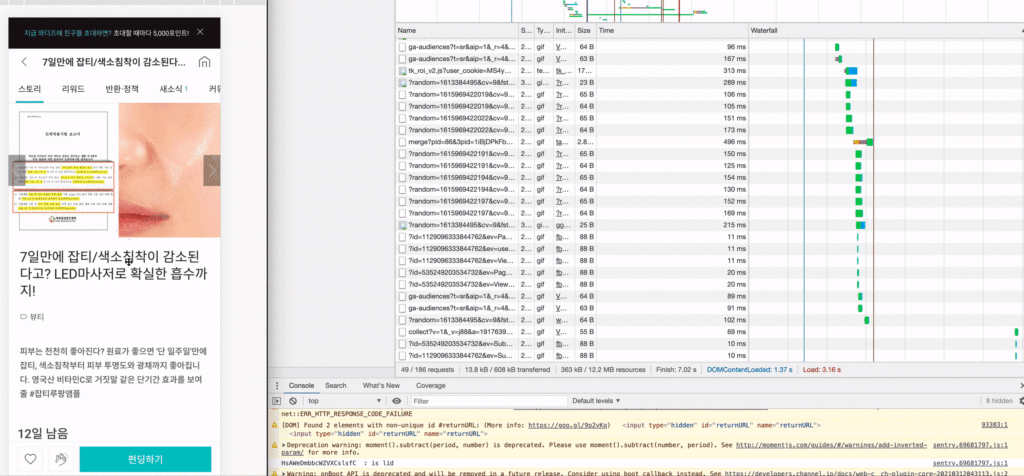
Example of image loading
Improved loading speed: 40% reduction
As a result of implementing lazy loading technology, the loading time for the funding details page has been reduced by approximately 40% compared to before.

Google Analytics
Reduced image downloads: 40–50% cost reduction
By configuring the system to download only the images displayed on the screen, we reduced CDN usage by approximately 40–50% compared to before.

Decrease in CDN usage
Future Challenges
Starting with the implementation of lazy loading for images on the funding detail page, we are sequentially rolling out various improvements to enhance the performance of Wadiz.
- Reducing image file size: Convert large GIF files to WebP or MP4 formats to reduce their file size while maintaining the same functionality
- Image placeholder technique: Using a placeholder that features the dominant colors of the actual image or a low-resolution version of the image
- Display images smoothly: Adjust the opacity value before loading
and so on…
Once these performance improvements are complete, we expect the quality of Wadiz to improve significantly.
We need more team members to tackle the challenges ahead. We are currently recruiting team members to join us in this effort, so we hope you’ll show your interest!

Looking for a colleague!
Finally, I’d like to thank the members of Wadiz top-notch FE development team, who always look out for me even amidst their busy schedules, and the development team members who worked with me on implementing the delayed loading technology—from the very beginning through to future improvements!
Thank you. Thanks to your help, we were able to improve the quality of the Wadiz funding service 🥰
Do you still have questions? 👀
Curious about the organizational culture of the FE Development Team that revamped the funding details page? 👉Click here