A Wadiz Intern's Hands-On Review of a Project Product: A Firsthand Look at the Crowdfunding Scene

This is a scene that any pet parent will likely recognize. It’s that deep, longing gaze you see when you leave your furry friend at home and head out. It breaks our hearts, but we’re all just busy working to pay for their food and treats 😭
Here’s a review of the Upi Smart Pet Camera, which even throws treats—I was able to check on my pet remotely and put my mind at ease!
Experience! The Crowdfunding Event Let’s get started.
Wadiz and the cutest pup ever, "Mumu," are here to show you how we use Wadiz crowdfunding products in real life🐾
What does Mumu do when he's alone?
Every now and then—very rarely—Mumu is home alone. Whenever that happens, I wonder what on earth Mumu is doing at home, if he’s sleeping well, and if he’s eating properly… I’m sure every pet owner feels the same way, right?
That’s when I spotted it: the Upi Smart Pet Camera…! With this, I can check in on Mumu in real time via the pet cam, even when I’m not right by her side. And thanks to the recording feature, I can even tell her what I want to say right then and there.

There’s a camera on the top of the device and a treat dispenser on the bottom. I think it’s a bit bigger than your average pet cam. I guess that’s because it has a treat dispenser and a treat container. The treat container is actually bigger than I expected 🤭
The Upi Pet Camera captures high-quality footage even at night. I tested it right away! It recorded crystal-clear footage in 1080p.🌙

A smart camera that turns to face the direction Mumu is in…🤭

The room was actually this dark.
Thanks to the smart AI motion tracking feature that rotates up to 270 degrees, I was able to catch every single move of our super-active Mumu! What’s more, with the zoom function that magnifies up to 2.5x, I could quickly pinpoint her location even when she was far away or hiding in a corner.
Even when I'm not around, he still eats his meals (and snacks) just fine.
What makes the Upi Smart Pet Camera special is that it can dispense treats. Just fill the "Pet Camera's treat dispenser" with treats, and you can give them to your furry friend!
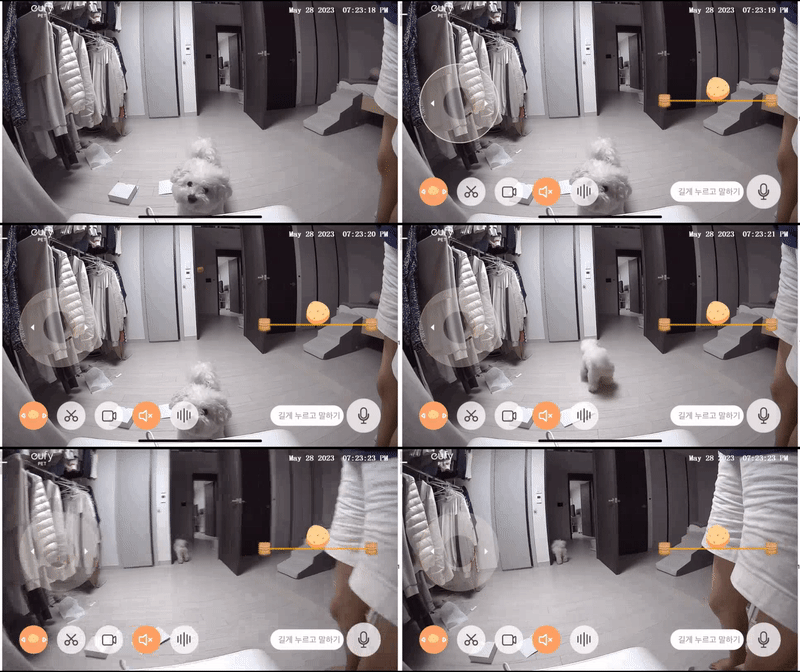
If you've loaded up on snacks, get ready to fire!!!
With the Eufy Pet app, all you have to do is tap "Throw Treat" and a treat is launched! You can also pull the ring on the right to throw the treat to the spot you want. Even though I'm far away, it feels like I'm playing with Mumu...😆

I've confirmed Mumu's location~ I'm on my way.
You can also set the direction based on where your dog is!
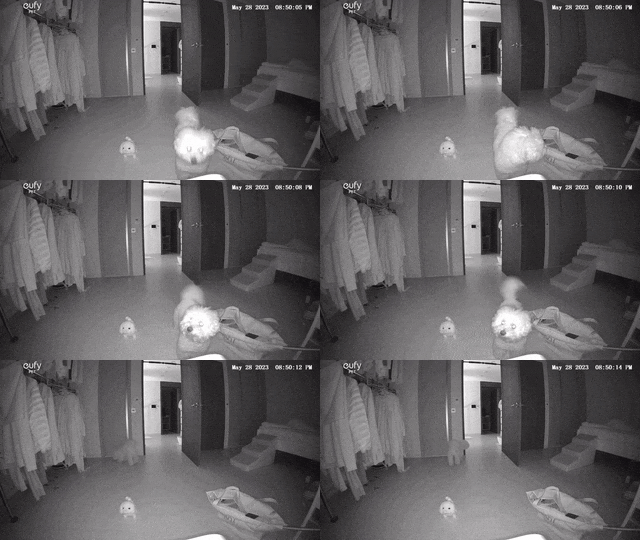
Successfully threw a treat at night! Mumu always manages to sniff out treats like a pro…
I showed MuMu how to put treats in the treat dispenser myself, so she knows that treats will come out. Maybe it’s because she hears the crinkly sound of the toy before the treats come out, but she wags her tail 🤭 She’s a genius dog, isn’t she…?
How do I use the app? 🐾
Now, let me walk you through exactly how to use the UPI Smart Pet Camera app! First, download the app.

The app is called eufy Pet!
Scan the QR code on the bottom of the product, then connect to your home Wi-Fi network.

You can also choose to receive activity notifications as shown below.

Mumuko is the name I gave my pet camera!
I thought it was a really user-friendly app because you can choose how you want to receive notifications 🤩

I was scrolling through an app and saw that it’s recommended to install a pet camera 1 meter above the floor for the “Treat Toss” feature. Sure enough, MuMu actually sniffed out the treats in the pet camera, charged at it, and knocked it over 😅 There’s a sticker on the bottom of the pet camera, so it’s even better if you stick it down!

Mumu comes running when she hears her big sister's voice coming from the camera🤍 She seems to like it even more because she hears the beeping sound she loves
I want to back this project—is it coming soon?
I decided, “I’ve got to back this campaign right now for our doggie and kitty…!” and went to the website, but

“Huh…? Wait, what is this!?
When I visited the website, it just says “Coming Soon, Sign Up for Notifications,”and it says “Coming Soon” and “Sign Up for Updates,” so I wondered if you might be thinking, ‘Does that mean I can’t back this project right now?’ That’s why I prepared this.

The Upi Smart Pet Camera is a project scheduled to launch, and it will go live on Friday, June 2, at 2:00 PM. You can view upcoming projects Wadizseparately using the following method.

Mobile

PC
Here’s a handy tip🍯
When you visit a project that’s scheduled to launch, you’ll see a button that says “Sign up for launch notifications.” If you sign up for these notifications, you’ll be notified when the project goes live.
Oh, you’re asking what the benefits are of receiving a launch notification? It means you can back the project with even better perks, like Super Early Bird and Early Bird offers. Early Bird and Super Early Bird rewards often sell out as soon as the project launches. If you sign up for notifications for the projects you’re interested in ahead of time, you won’t miss out on the rewards and benefits you want ✨
Today, we took a look at the Upi Smart Pet Camera—which lets you toss treats to your adorable Mumu—as well as its upcoming launch and notification sign-up service. 👀
I’ll be back soon with more informative and fun projects and funding updates!