Hello, I'm a developer on the Wadiz FE development team.
Before I get into the main topic, I'd like to share a video with you.

What do you think? If you don’t feel anything at all, that’s exactly the point!
The video above is from the web version, not the app. We’ve recently improved the user experience on the web by applying SPA technology to users’ main navigation paths Wadiz. So, if you don’t feel any lag, discomfort, or anything else—and everything feels natural—that’s exactly how it’s supposed to be. In this post, I’ll walk you through the details of these improvements.
Background
Many Wadizpages used a mix of SSR (Server-Side Rendering) with JSP and CSR (Client-Side Rendering) with React in certain sections. Visually, it looked like this:
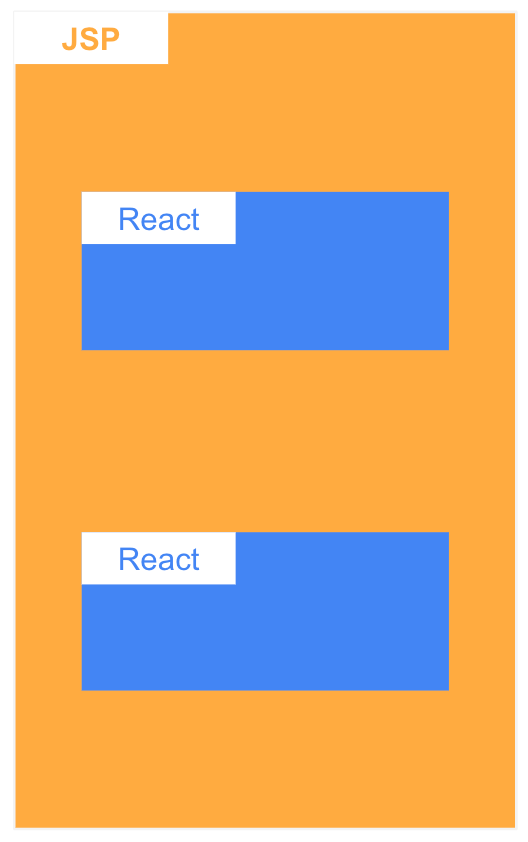
A view of the Wadiz page divided into JSP and React sections
We frequently received requests to add or modify features on our legacy JSP pages. So, we decided to use React—which is relatively easier to maintain than JSP—to update certain sections of the interface.
However, this method had the following drawbacks:
- Since the code for a single page is spread across the front-end and back-end repositories, it is difficult to understand the code flow.
- Development can be challenging when communication between JSP and React is required.
- All libraries used in JSP and React are loaded, resulting in slow performance.
- Since each React section is implemented as a separate app, they call the API individually, resulting in different rendering timings and causing frequent CLS (Cumulative Layout Shift) issues.
The biggest drawback of code that’s hard to maintain is that developers don’t want to maintain it. 😂
(If developers don’t want to maintain the code, the planner’s design will run into a major roadblock in the form of the developer’s “That won’t work…”.)
To address the maintenance issues mentioned above, we converted the JSP pages into a pure React app and implemented a single-page application (SPA) for navigation between pages.
SPA Implementation Process
Convert a page built with JSP and React to pure React
Although I said it was a modification, due to the nature of JSP, there’s hardly any code that can be reused in React. Yes, we developed it from scratch.
We added a REST API to the backend to enable CSR (Client-Side Rendering). We also modified the code so that the props previously injected in the Java Controller are now fetched via the API. Although this was a new development project, the key components were already part of our design system, which allowed us to complete it quickly.
SPA Implementation
새롭게 개발한 페이지를 React Router에 추가하고 페이지 이동을 a tag에서 <Link> 컴포넌트 혹은 history를 사용하도록 변경했어요.
Modifying the bundle (React App) included in JSP
Even if you navigate directly to each page, you must include the same bundle in the JSP for each page so that it behaves as a single-page application (SPA) when switching between pages.
Overcoming the Drawbacks of SPA
It wasn’t enough to simply improve page transition speeds by implementing an SPA. We also had to overcome the drawbacks of SPAs. These drawbacks include SEO (Search Engine Optimization), slow initial loading speeds, and CLS.
Overcoming Weaknesses 1. SEO (Search Engine Optimization)
Popular search engines support script execution. As a result, most of the issues revolve around providing metadata. Wadizwas using JSP to provide metadata. Even after implementing SPA, we did not remove the existing JSP files; we simply changed the bundles being included. This allowed us to retain the metadata even after implementing SPA.
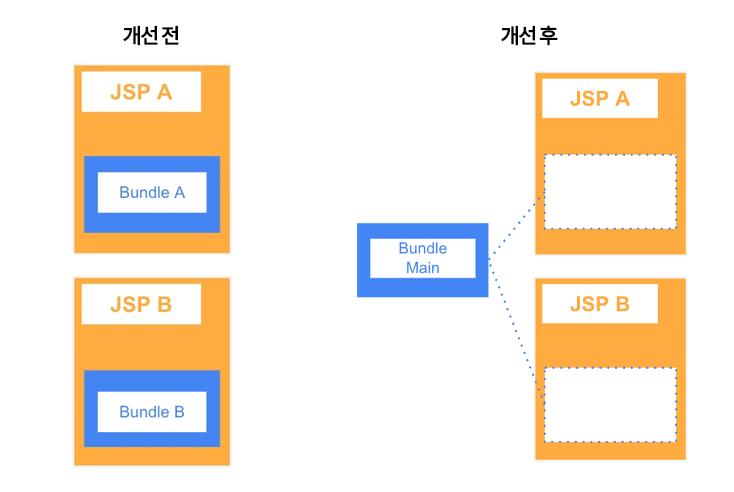
Overcoming Drawbacks 2. Slow Initial Loading
Merging pages that were previously split into multiple apps (bundles) into a single app (bundle) increases the bundle size. While SPA apps have the advantage of fast screen transitions, they have the disadvantage of slow initial page loading.
Just because it's an SPA app doesn't mean it has to be a single bundle. By splitting the bundles using Webpack's SplitChunk feature and loading them with React's `lazy` hook, you can load only the necessary bundles when they're needed.
Wadizimproved initial loading speeds by separating each page and large third-party libraries into separate bundles and implementing lazy loading.
Overcoming Weaknesses 3. CLS
When each area of the screen calls APIs and responds independently, rendering them separately causes users to experience unexpected layout shifts where content moves around the screen. This issue can be resolved by rendering the screen only after all necessary data is ready or by applying a skeleton layout. We minimized layout shifts using the following methods.
- Display the spinner until all required data for page rendering has been received
- Apply a skeleton to elements that require rendering when they enter the viewport
- Apply fixed dimensions to elements whose size changes after loading, such as images
Leveraging the Benefits of SPA
One of the advantages of SPA is that it can replicate the behavior of a native app. Let me explain the approach we chose.
Prefetch
A typical SPA page transition follows this flow:
Page transition → API call → Load bar displayed → API response → Page rendering
This flow has the issue that a white screen (loading bar) is always displayed during page transitions, which is of little significance to the user. Since Prefetch operates as the next step in the flow, it can eliminate the need for the loading bar.
Click card → API call → API response → Page transition & rendering
We used the `staleTime` option in ReactQuery for data sharing.

To clearly demonstrate the effect, I ran the test on a slow network (3G).
History Modal
There is a significant difference between how modals behave in native apps and on the web—specifically, how they are closed. In native apps, modals are closed by clicking the back button. On the web, however, clicking the back button typically takes you back to the previous page. By utilizing the browser’s History API, you can implement a modal that closes when the back button is clicked.
If you add logic to accumulate the history using `history.push` when the modal opens and close the modal via the `popState` event, you can implement a modal that closes when you click the back button. While this is a simplified explanation, a few additional technical considerations are needed to manage it effectively.

Wadiz Service Video
Keep the previous screen
Preserving the previous screen in the user navigation flow is a very important feature. In native apps, since each page is created anew when navigating, preserving the previous screen is the expected behavior. However, on the web, since the content is redrawn within a single screen, preserving the previous screen can be tricky.
If the data remains unchanged when you return to the previous screen, you can keep that screen open. Wadiz, we use ReactQuery to manage server data and apply ReactQuery’s `staleTime` property. This allows us to retain the data for a specific period, ensuring it remains intact even after the screen changes.
One important point to note is that since ReactRouter restores the scroll position using `useLayoutEffect`, the data must be restored before this hook is called. If the data restoration occurs too late, you’ll need to add separate logic to maintain the scroll position.

Wadiz Service Video
Expanded to the Wadiz app
The Wadiz app is a hybrid app that combines native components (service home screens) and a webview (detail pages). Previously, whenever a user navigated to a detail page from a native screen, a new webview was created each time. To implement a Single-Page Application (SPA), we needed to switch to a system that reuses a single webview, which required some technical development work. Below is a summary of that development process.
Develop a page transition function (interface) to enable the reuse of the WebView
I needed an interface to request page transitions within the app. The pages that can be converted to a single-page application (SPA) are configurable, so I passed whether to convert to an SPA as the return value.
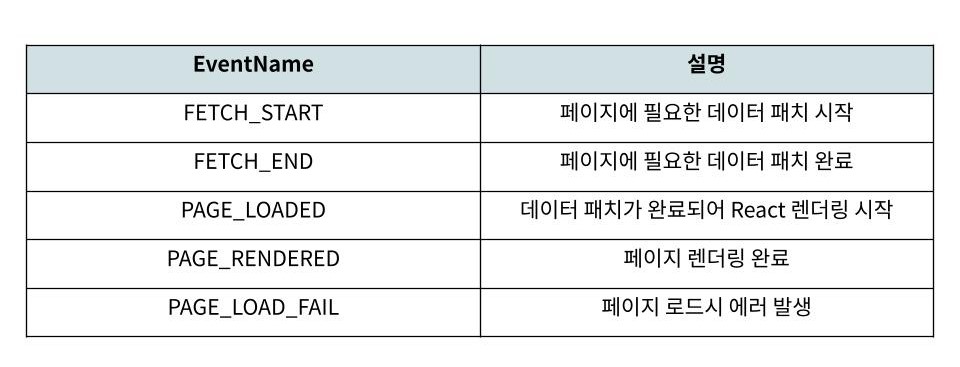
Definition of the page transition state protocol (event)
In the app, we've defined the following events to check for success or failure and measure performance when the SPA loads.
Developing a custom hook to ensure the component lifecycle functions properly
On the web, users rarely revisit the same page repeatedly. However, when reusing a WebView in an app, users often revisit specific pages repeatedly. Because React Router reuses components as long as the path doesn’t change, there may be an issue where the initialization code (useEffect) for each component on the page isn’t called in the flow described above.
We developed a custom hook to clear the current page and redraw it when the app requests a SPA transition via an interface.
Future Plans
We’ve taken a close look at how we’ve optimized the site using SPA so far. Moving forward, I’d also like to address the issue of slower initial page loading compared to the SSR approach. We plan to implement Next.js to improve the site using a combination of SSR and CSR.
Do you still have questions? 👀
How FE Developers Can Adapt to TDD 👉Click here
See how developers work 👉Click here