
Hello. This is the Wadiz App Development Team.
TheWadiz technical organization often forms single teams to collaborate on specific projects. In this post, we’d like to share how the App Development Team and the FE Development Team joined forces as the Client Development Team to improve the loading speed of Wadiz ’s detail pages by approximately 38% on Android and 66% on iOS.
Let's start by looking at the difference in loading speeds before and after the improvements!

Loading speeds may vary depending on your device and network environment.
Background
The Client Development Team, the App Development Team, and the Front-End Development Team worked together to identify areas for improvement. Since the detail page is the most frequently visited page, we set a goal to improve its loading speed.
Previously, Wadiz Web had already improved the loading speed of detail pages by adopting a single-page application (SPA) approach.
Here, SPA stands for Single Page Application, which is a method where the entire page is loaded once at the beginning, and subsequent changes to the screen are made by binding data via Ajax.
In the app, whenever a user accessed a detail page, a new WebView was created and the URL was loaded, which meant the entire page had to be reloaded every time. As a result, we couldn't incorporate improvements made on the web. We hypothesized that if the web view for the detail page in the app were to operate using the SPA (Single Page Application) model, we could improve loading speeds.
How did they improve it?
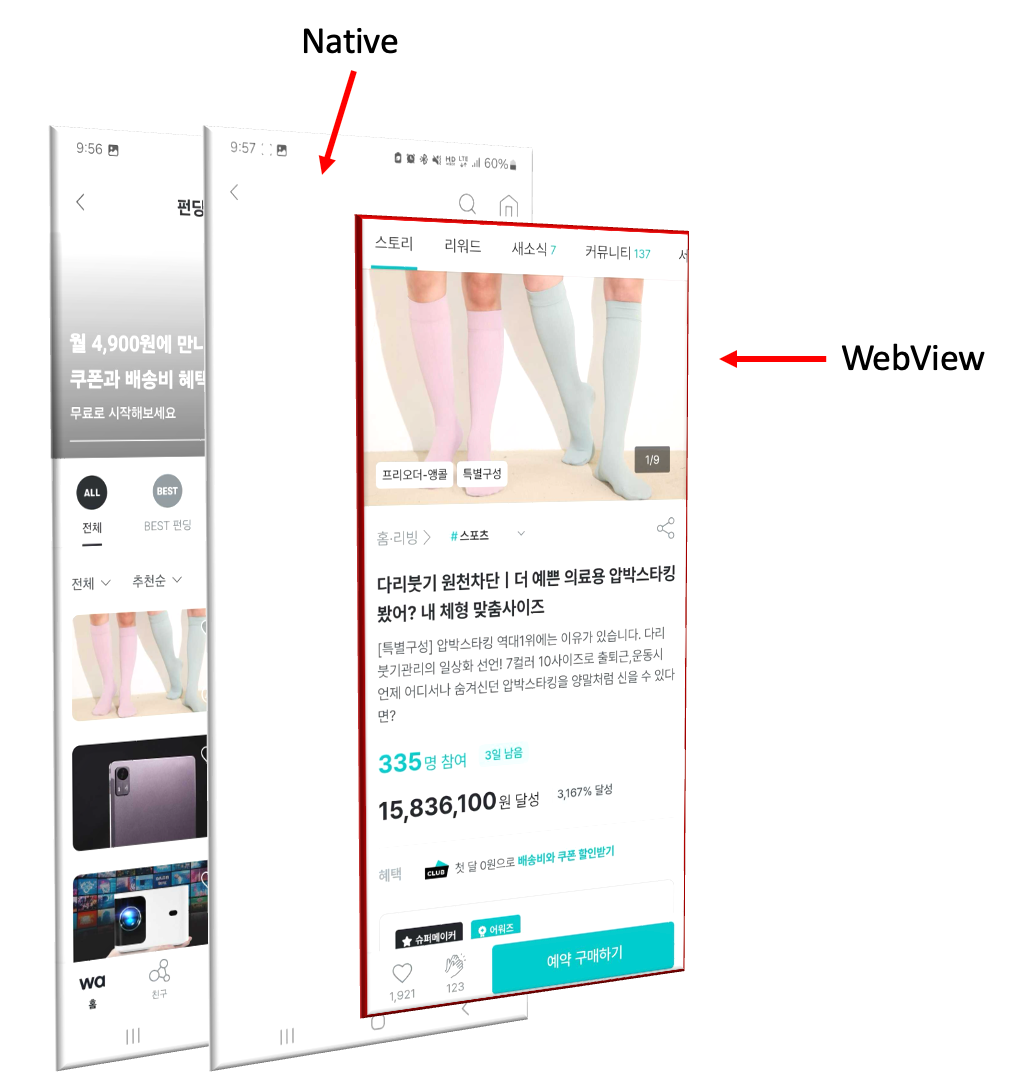
On the detail page of the existing app, the web view would disappear whenever the page was closed—for example, when the user tapped the close or back button. This made it difficult to implement a single-page application (SPA). To solve this problem, we explored ways to keep the web view open even after the detail page had closed.
As a result, we designed the system so that the WebView is kept separate, as shown in the photo below, and can be displayed on the screen whenever needed. We validated this through a Proof of Concept (PoC).
Detailed Development Plan
When displaying on the screen
- When the app launches for the first time, it pre-creates a WebView for reuse and loads a splash screen to prepare for SPA transitions.
- When a user accesses the detail page, a new screen appears, and a pre-generated web view is displayed on the screen.
- When you request a transition to an SPA on the web, the web page loads the data and displays it on the screen.
When the window closes
- Detach the WebView that's attached to the screen.
- This releases other event listeners and objects from memory, excluding the WebView.
Every time you visit a product page, this process takes place, allowing us to provide a better user experience with faster loading times.
What about the callbacks previously provided by WebView?
When the page loads, Android's onPageStarted, iOS's webView(_:didCommit:)When this method is called and the loading is complete, Android's onPageFinished, iOS's webView(_:didFinish:is called.
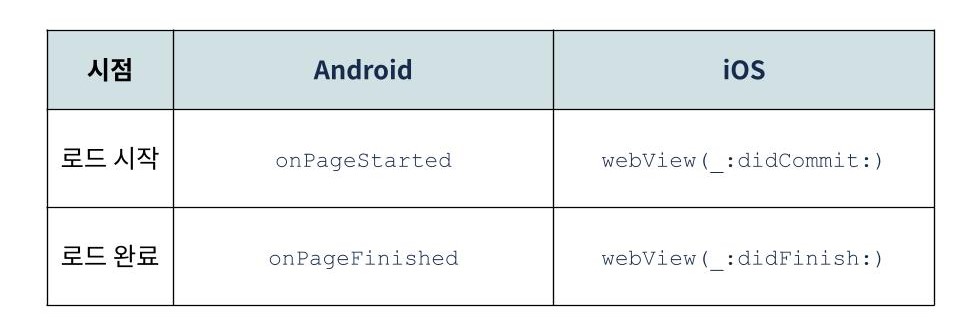
However, when the page changes due to the switch to SPA, the WebView-related methods mentioned above are not called. This means you can't perform the tasks that were previously handled.
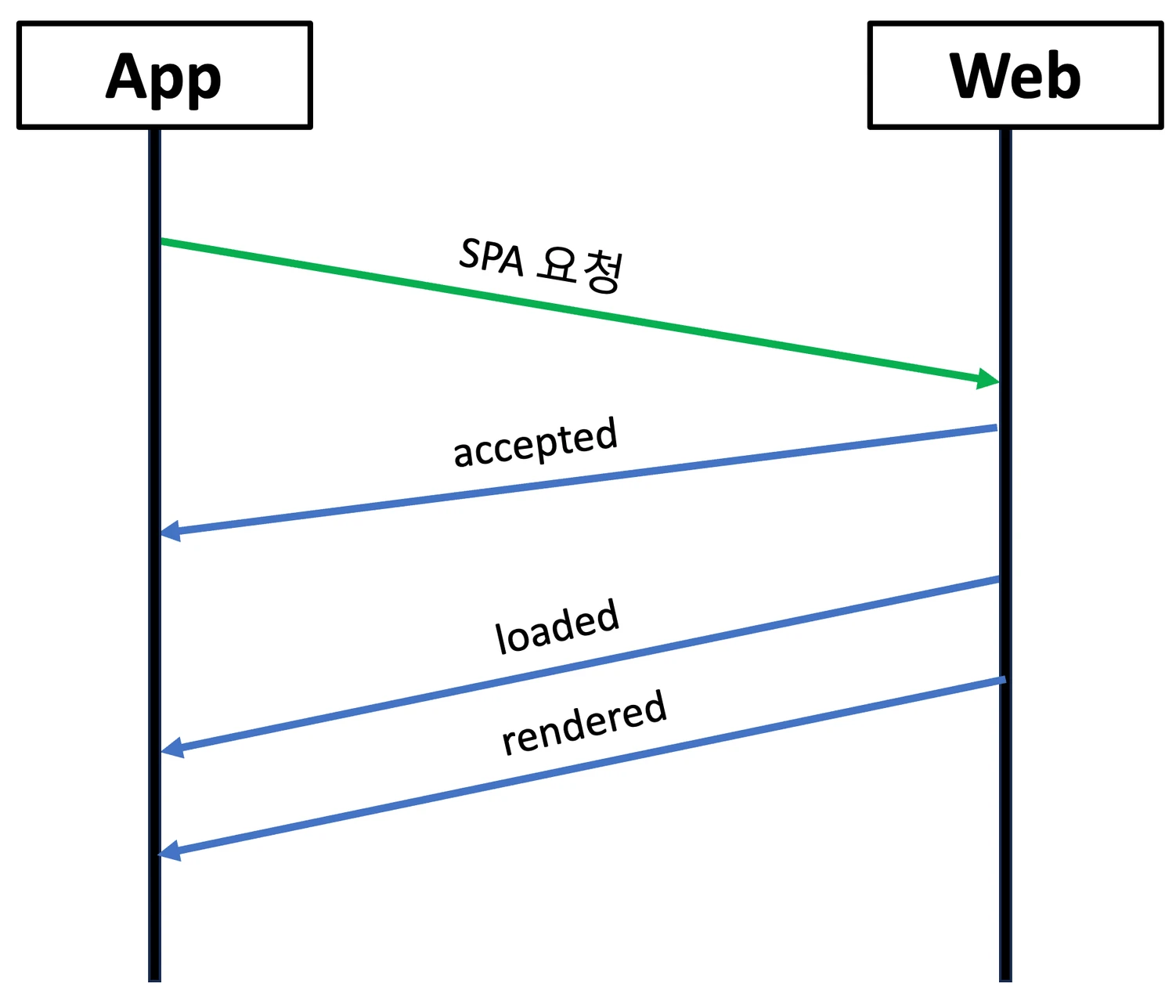
In response, we decided to handle it as a communication interface between the web and the app.
Defining Wadiz Web-to-App Events
- accepted: An event that indicates the web side can process an SPA request sent from the app
- loaded: When all data for the detail page has been loaded
- rendered: When the screen is displayed on the detail page
- failed: When loading fails
What were your concerns regarding the new approach?
Just because it’s a new approach doesn’t mean it’s all advantages. We had a lot to consider when adopting this new method, as there’s always a chance of unexpected side effects. To prepare for this, we’ve compiled a list of questions and contingency plans.
What are the issues that arise when a WebView is created in advance?
Pre-rendered web views can cause issues. For example, when a new web page is updated, the changes may not be reflected in the web view, and login sessions may expire. To avoid these issues, we’ve configured the web view to reload the URL every 30 minutes, rather than switching to a single-page application (SPA). This ensures that the content is always up to date whenever a new request is received.
What if the web or app isn't receiving events?
Since WebView callbacks cannot be received when pages are navigated using the SPA approach, events passed from the web are extremely important. I felt that reloading the page was the best course of action rather than having the web and app sit idle while waiting for events. I’ve come up with two solutions.
First, we wait for the `accepted` event to verify that the web environment is capable of handling the SPA transition. If the `accepted` event does not arrive within 0.2 seconds, we determine that the environment cannot handle the transition and reload the page.
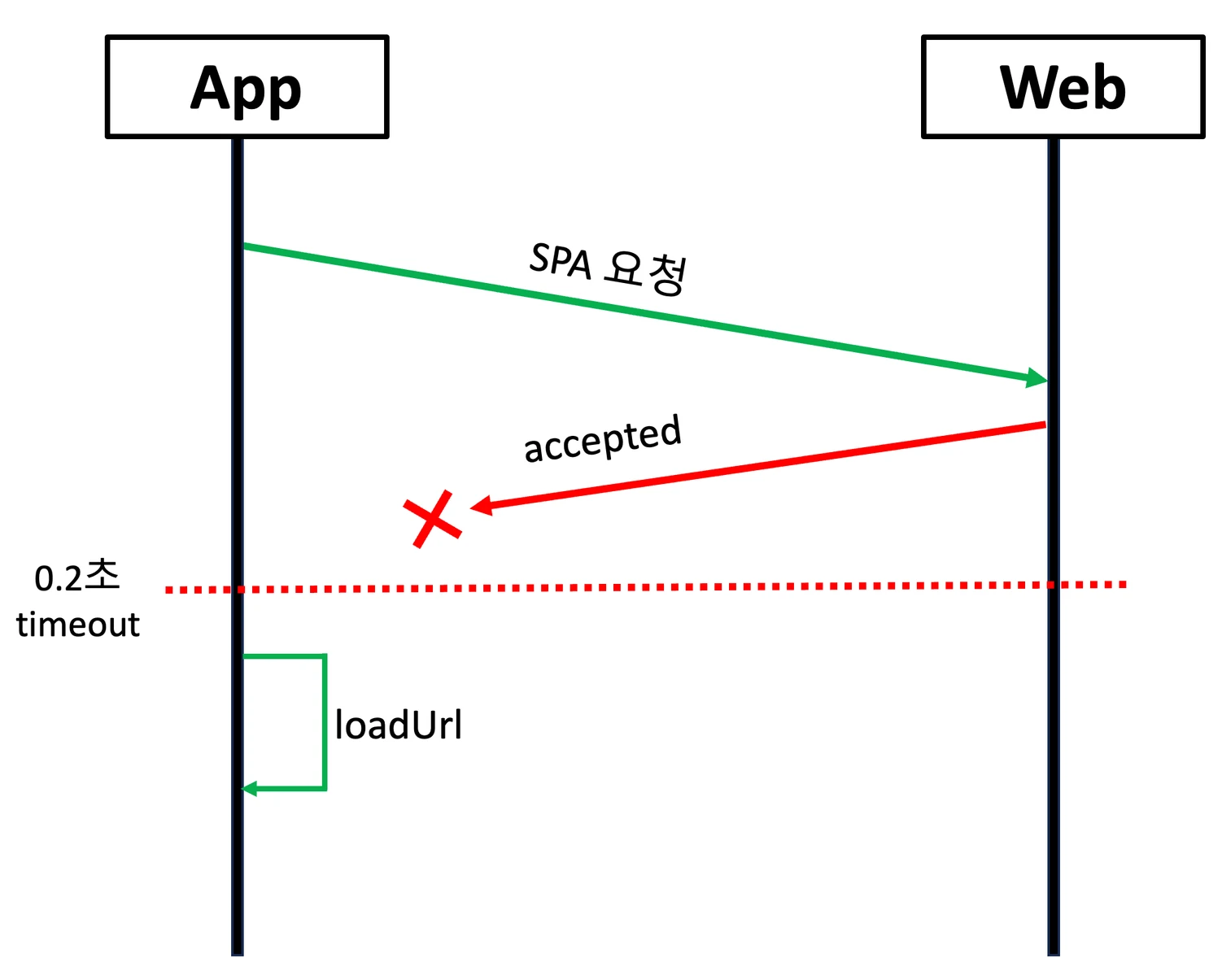
Second, check the response value for the SPA request. If the response value for the SPA request is true, this indicates a normal situation, and the screen is switched using the SPA method. However, if it is false or null, the system determines that the screen cannot be switched using the SPA method. In this case, the page is reloaded.
Memory leak
During the development and testing of an Android app, we encountered a memory leak when a WebView and a Fragment were linked. Memory leaks can cause the app's memory usage to increase continuously, which can impact overall performance.
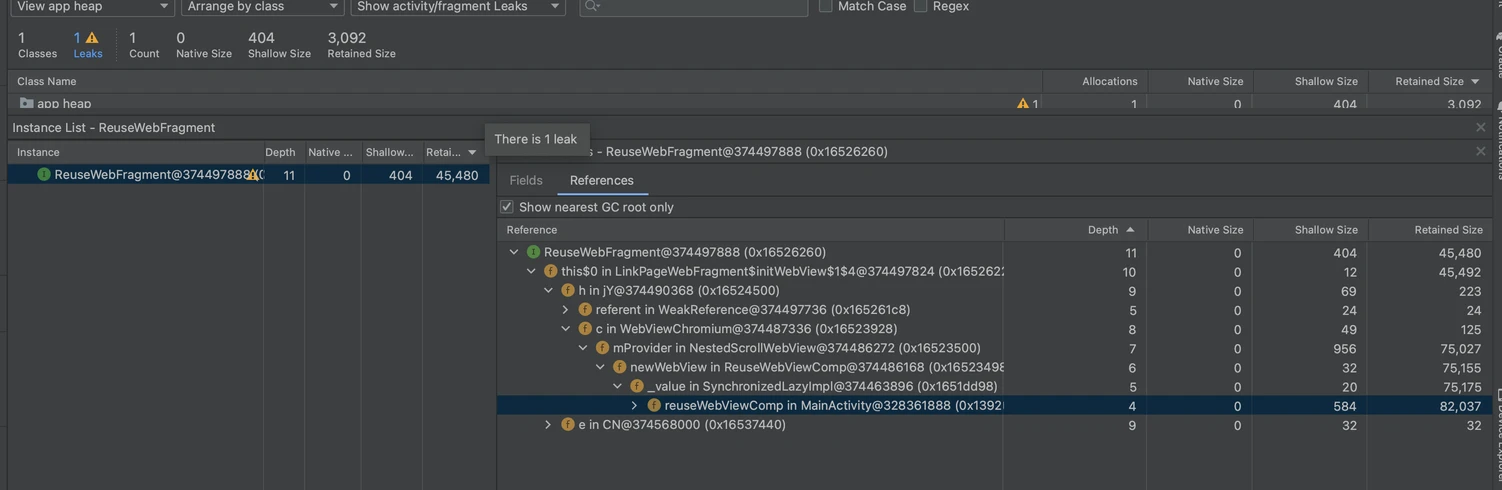
To resolve this, we completely separated the WebView and the Fragment when the detail page is closed. onDestroyView, onDetach I removed the event listeners for the WebView, as well as the WebViewClient and WebChromeClient.
    override fun onDestroyView() {
        super.onDestroyView()
        webView?.setOnKeyListener(null)
        webView?.webChromeClient = null
        webView?.webViewClient = WebViewClient()
    }

    override fun onDetach() {
        super.onDetach()
        webView = null
    }
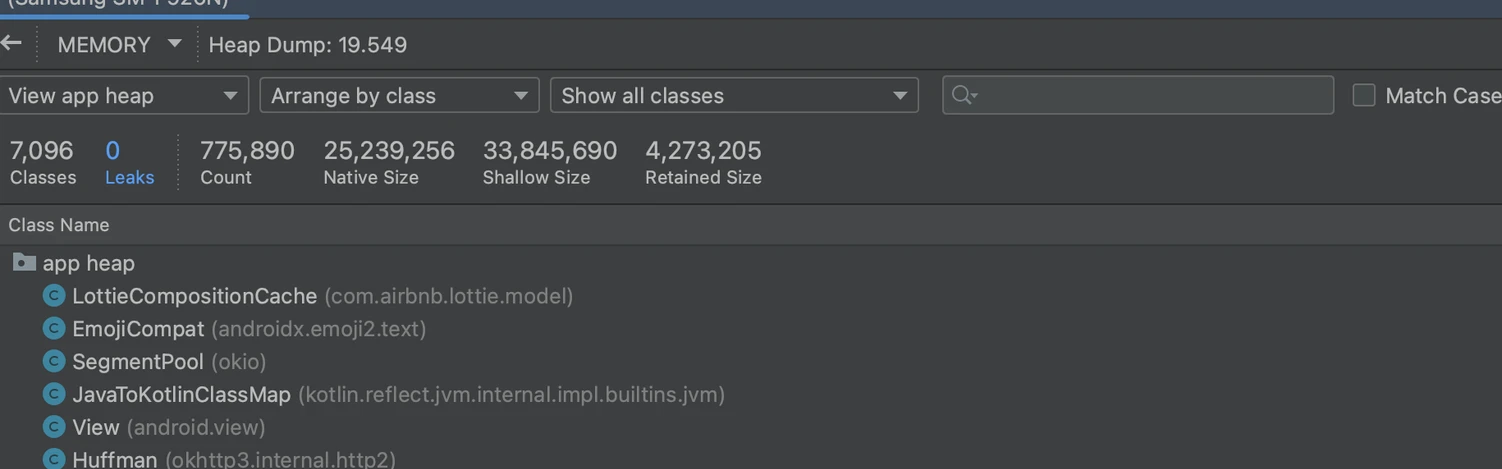
After fixing the memory leak, we confirmed that it is functioning normally.
Troubleshooting Using RemoteConfig and A/B Testing
Since the page we wanted to improve was the most frequently visited detail page, it was crucial to have a robust plan for handling outages. To prepare for potential outages, we considered two approaches.
This approach allowed us to improve the user experience while also proactively addressing issues.
Improvement Monitoring
We added a new attribute using Firebase Performance to monitor the improved loading speed.
By categorizing improvements into success, failure, and non-application cases, we were able to track trends in users’ environments. During the monitoring process, we found that the rate of transition to SPAs reached approximately 60%. This indicates that users are experiencing faster and more efficient navigation between pages.
As shown in the graph below, we were able to confirm that loading speeds improved following the optimization.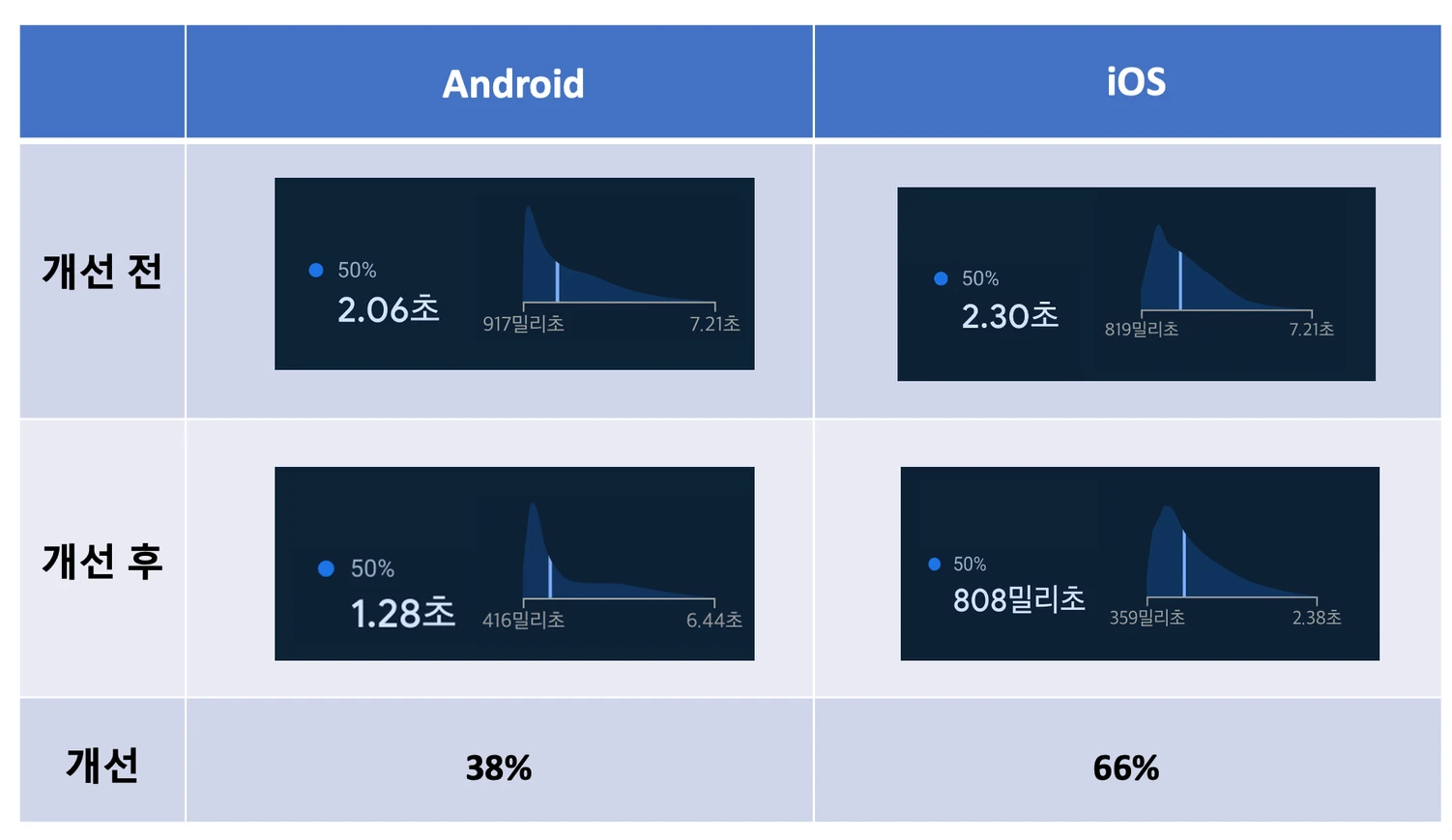
In closing
Developing a hybrid application presented some challenges for this project. It also required a lot of communication between the web and app teams, such as tracing the root causes of issues when they arose. I’d like to express my gratitude to the Front-End Development and QA teams for their positive and enthusiastic collaboration throughout. Thanks to your support, we were able to wrap up the project on a high note.
Moving forward, the Client Development Team will continue to collaborate with other teams to enhance the Wadiz service and provide users with an even better experience. We look forward to discovering new ideas and innovations as we grow together.
Do you still have questions? 👀
Want to know how the FE development team improved the speed of web detail pages using the SPA approach? 👉 Click
The App Development Team’s Journey to Adopting Compose Multiplatform 👉 Click


