Hello. I’m an iOS app developer on the Wadiz App Development Team.
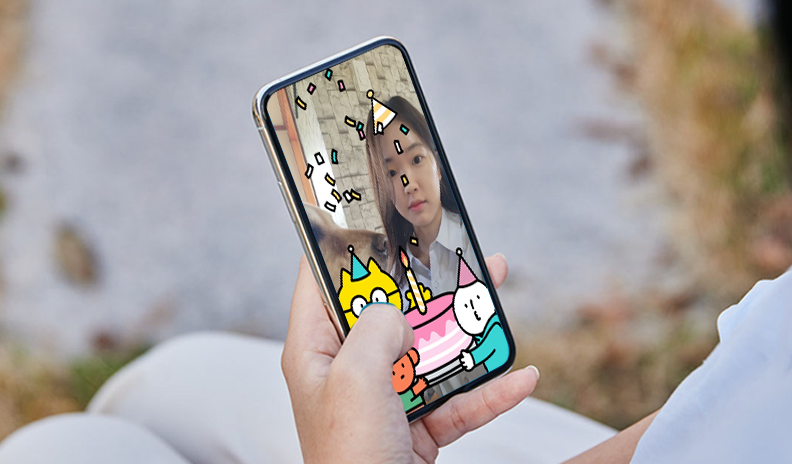
Recently, Wadizhas ARKitto create birthday celebration filterusing ARKit. I’d like to share the process behind it.

Development Background
Is your birthday coming up soon? You can use the birthday celebration filter feature on Wadiz for three days before and after your birthday.
After granting camera access, the front camera will recognize your face and display a party hat. When you press the record button, Wadizmascot characters—Jinguk, Genie, and Joy—will appear and strike a pose to take a photo with you.
This feature was created as part of an initiative to encourage Wadiz users to participate in funding campaigns through birthday coupons. We wanted to incorporate the fun element of a user participation event into the app.

The sunglasses have nothing to do with the actual service!
Face Recognition Using ARKit
ARKit is a software framework for creating AR (augmented reality) apps that was unveiled at WWDC17. ARKit provides technology that uses the camera and sensors on iOS devices to create virtual worlds based on the real world.
It uses the camera to track your current location and orientation, and can perform tasks such as object detection and feature extraction.

Reference: Apple Developer Documentation
ARKit's ARSCNView is a SceneKit-based 3D view. ARSCNView processes camera input data in real time to display virtual objects. ARSCNView requires an active session to function, and ARSession settings are configured using ARConfiguration.
ARKit provides the following types of ARConfiguration. Each configuration allows users to have a different AR experience.
AR World Tracking Configuration
ARGeoTrackingConfiguration
AROrientationTrackingConfiguration
AR Body Tracking Configuration
AR Face Tracking Configuration
Among these, `ARFaceTrackingConfiguration` detects faces from the data received via the camera and provides face information through `FaceAnchor`. Then, within the `ARSCNViewDelegate` functions,
func renderer(_ renderer: SCNSceneRenderer, nodeFor anchor: ARAnchor) -> SCNNode?This allows you to create a new node based on a new ARAnchor detected by ARKit.
func renderer(_ renderer: SCNSceneRenderer, nodeFor anchor: ARAnchor) -> SCNNode? {
    guard let device = MTLCreateSystemDefaultDevice() else { return nil }
    let faceGeometry = ARSCNFaceGeometry(device: device)

    let faceNode = FaceFilterNode(geometry: faceGeometry)
    let headNode = HeadNode(with: "filter_hat")
    let eyeNode = EyeNode(with: "filter_sunglasses")
    faceNode.addChildNode(headNode)
    faceNode.addChildNode(eyeNode)

    return faceNode
}
The EyeNode and HeadNode above are defined as subclasses of SCNNode, as shown below. They are responsible for applying filter images to the head and eye positions.
class EyeNode: SCNNode, FilterNodeElementProtocol {
    init(with imageName: String, width: CGFloat = 0.2) {
        super.init()
        setup(with: imageName, width: width)
    }
    func updatePosition(for vectors: [vector_float3]) {
        let eyeIndex = 12
        if let newPosition = vectors[safe: eyeIndex] {
            self.position = SCNVector3(newPosition)
        }
    }

    //...
}
The `vectors` array passed as a parameter to the `updatePosition` function is from FaceAnchor's ARFaceGeometry an array containing the vertex elements of each face provided by,
The center of the eye
The center of the mouth
tip of the nose
It provides detailed information on approximately 1,220 items, among others.
Once you've created a new node like this, you need to update it every frame. Another ARSCNViewDelegate method is
func renderer(_ renderer: SCNSceneRenderer, didUpdate node: SCNNode, for anchor: ARAnchor)is handling this.
func renderer(_ renderer: SCNSceneRenderer, didUpdate node: SCNNode, for anchor: ARAnchor) {
    guard let faceAnchor = anchor as? ARFaceAnchor,
    let filterNode = node as? FilterNode else { return }

    filterNode.geometry.update(from: faceAnchor.geometry)
    let vertices = anchor.geometry.vertices
    filterNode.subNodes.forEach { $0.updatePosition(for: vertices) }
}
This updates the geometry information in the FilterNode created to generate the filter image, and uses the newly obtained vector data to update the positions and orientations of the EyeNodes and HeadNodes.
And just like that, you’ve created a cool filter feature. It’s super simple, isn’t it? 😁

While working on the project
There were both interesting and disappointing aspects to working on this project!
ARKit's `ARFaceTrackingConfiguration` only supports the front-facing camera. To enable support for the rear camera as well, you'd need to implement a feature that detects facial features frame by frame using the Vision Framework or similar tools. It was disappointing because this proved to be practically difficult.
There are also some areas I’d like to improve on in the future. Did you notice that both the sunglasses and the conical hat are 2D elements? If I had used 3D modeling, I could have created a more immersive AR experience regardless of the viewing angle. I’d like to continue this project and add 3D elements.
The camera recording features and ARKit implementation I worked on this time aren’t something many developers get to experience. It was quite challenging at first to build the system from scratch, rather than using the frameworks and libraries I was accustomed to. However, I enjoyed establishing my own set of ground rules—figuring out how to implement these features quickly and identifying key points to watch out for.
I think this was a truly valuable experience for me as a junior developer!
Do you still have questions? 👀
Curious about the App Development Team’s culture? 👉 Click here
The App Development Team also created the Instagram share feature! 👉Click here