Hello. This is the Service Platform Team Wadiz.
The Service Platform Team develops and operates Wadizinfrastructure and databases, as well as various shared services (payment, main site, notifications, and file management).
Managing the Growing Volume of Data Efficiently
The volume of data generated and processed by companies and users is growing at an unimaginable rate every year. Since 2010, the volume has surpassed the zettabyte mark and continues to grow at an enormous scale.
As a result, organizations have had to encrypt critical data to enhance security or manage data using dual or triple redundancy to ensure high availability. It has also become standard practice to support various sizes and formats to improve accessibility and compatibility across a wide range of devices.
Wadizalso uses dedicated shared storage to store its growing data and ensure stable operations. We’ve set up a NAS (Network Attached Storage) system using GlusterFS. GlusterFS is a software-defined storage solution that supports scale-out.
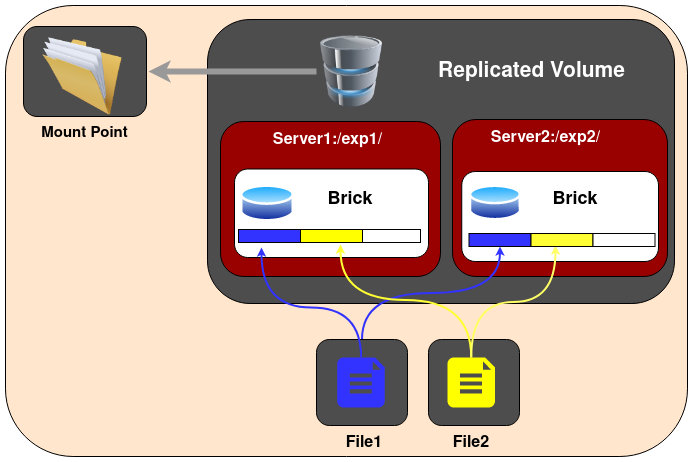
GlusterFS Architecture (Source: GlusterFS)
One of the key advantages of GlusterFS is that it prevents data loss through its replicated volumes. It also allows you to easily scale volumes in increments of a single brick.
However, it shares the same limitations as a NAS. It tends to slow down when the volume exceeds a certain size. In legacy environments, in particular, the initially configured network bandwidth often struggles to handle the increased storage capacity. You may also encounter prolonged network bottlenecks during the GlusterFS rebalancing process after adding a new brick during operation. While you can improve bandwidth to some extent by logically bundling multiple NICs (Network Interface Cards) through network bonding, this remains only a short-term fix unless the overall network bandwidth between other physical devices is improved.
We realized that simply expanding our storage capacity was not enough to meet our growing storage needs. To reduce the network traffic load concentrated on our on-premises infrastructure, we decided to actively leverage public cloud storage. We also committed to gradually improving the areas of our storage that were unclassified and difficult to organize, thereby overcoming the limitations of our legacy systems.
Using Cloud Storage
We have established the following process to adopt and transition to cloud storage.
Labeling → Syncing → Storing → Archiving → Accessing
Previously, we were using GlusterFS, a distributed storage solution, to manage data for a variety of uses and purposes. However, as time went on, the criteria and objectives for organizing the data became unclear, leading to various management challenges.
So, the first step we established was data labeling.
Data Labeling
- What constitutes important data?
- What is the purpose of the data being used?
- Does this need to be stored and managed for a specific period of time?
When it comes to data, security is key. It is important not only to enforce access permissions but also to ensure stability across various devices when storing and downloading data. We needed to clearly distinguish between files accessible to anyone (such as images and product demonstration videos) and those required for product review and management. Therefore, we believed that classifying and labeling data based on files accessible to the public—and managing them according to their intended purpose—would lay the groundwork for our transition to cloud storage.

Data Syncing
There are several solutions available for uploading publicly accessible data to AWS S3 (Simple Cloud Storage) either as a one-time upload or on a recurring basis. You can easily use AWS CLI commands, Storage Gateway, Data Sync, and other tools for this purpose.
Here are a few useful commands.
- AWS S3 cp –recursive on-premise//files s3://in-cloud/files
- AWS S3 sync on-premise//files s3://in-cloud/files –only-show-errors
Use the `sync` command only when uploading the remaining files after the initial upload. You can increase the number of concurrent upload requests by adjusting the `max_concurrent_requests` parameter (default value = 10). However, since the `sync` command consumes significant resources (CPU, memory) for file comparison, it’s not ideal for this purpose. Therefore, it’s best suited for simple file copying.
While using Data Sync offers many advantages over the CLI in terms of speed control and performance, it can be difficult to implement in certain NAS environments. In particular, since it does not support GlusterFS, we were unable to implement it in practice. (We have received feedback that there are plans to add support in the future.)
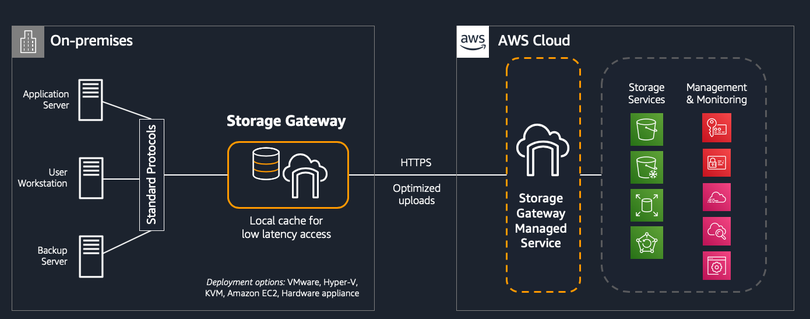
High-level architecture of Storage Gateway (Source: Amazon)
You can easily set up Storage Gateway by following the guide above. It offers three main types.
File Gateway
- You can use file protocols such as NFS (Network File System) and SMB (Server Message Block) to store and retrieve objects in Amazon S3.
- To ensure low-latency access, recently used data is cached on the gateway, which manages all data transfers between the data center and AWS.
Volume Gateway
- Provide block storage to on-premises applications using an iSCSI connection.
- Users can create a volume copy at a specific point in time, which is stored in AWS as an Amazon EBS snapshot.
Tape Gateway
- It provides an iSCSI virtual tape library (VTL) interface—comprising virtual media changers, virtual tape drives, and virtual tapes—to backup applications.
- Backup applications use a virtual media changer to load virtual tapes into virtual tape drives, enabling them to read from and write to the virtual tapes.
Using Storage Gateway's File Gateway may be more reliable than the CLI. However, one drawback is that it lacks options for adjusting upload and download speeds. Since it consumes network resources even when idle, caution is advised in environments where network bandwidth is limited.
Data Storage and Archiving
We configured MinIO (object storage) in our on-premises environment to store files that require private access. For files that can be accessed publicly, we used AWS S3.
I agree that it is more efficient to migrate and store all related files to S3 at once. However, integrating with existing backend services and labeling all files are tasks that require significant time. I believed that a phased migration—by year or by service—would be more effective for the stable operation of our storage services, including legacy systems.
In addition, using AWS S3 Glacier allows you to archive files cost-effectively. However, this requires a thorough understanding of the various storage classes available.
Data Access
Given this situation, we had no choice but to consider data accessin a hybrid storage environment. If all newly created files were stored in the same environment, it would be easy to establish policies. However, in a scenario where data is divided across different storage environments based on time or purpose, we needed to provide seamless access to both data stored on-premises and data migrated to S3.
We utilized the virtual host linking feature of the STON server. This allowed us to make files that were not present on our on-premises storage accessible from the public cloud environment.
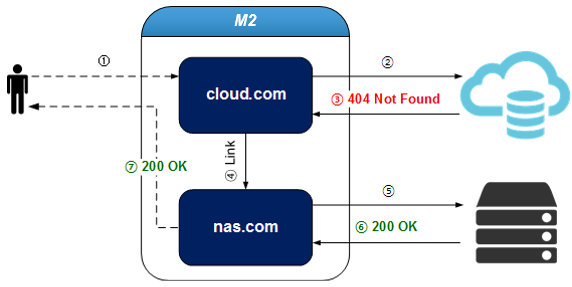
Virtual Host Link Description (Content not found on cloud.com is handled by nas.com / Source: readthedocs)
In addition, this feature was effective for leveraging the various image processing tools (such as resizing, optimization, and watermarking) offered by existing CDN services.
The Benefits of Using Cloud Storage
Through a series of steps focused on “utilizing cloud storage,” we’ve been able to establish an environment that can respond quickly to storage growth. Previously, the entire process—from purchasing storage to handover and expansion through preventive maintenance (PM)—took anywhere from two weeks to three months. Cloud storage, where you pay only for what you use, has allowed us to respond much more quickly.
2) By shifting the network traffic load from on-premises to the cloud, we’ve been able to provide more stable services. Additionally, 3) given the nature of startups—where new plans and great ideas are constantly emerging—we need to develop quickly and deliver features to customers. Now, we can improve our existing storage environment without having to rebuild our legacy backend services from scratch.
There are certainly many diverse and convenient public cloud solutions available, and the field continues to evolve.
However, transitioning to the cloud while improving your legacy environment—rather than simply adopting a "lift-and-shift" migration strategy—requires careful consideration and a thorough understanding of the available solutions.
Our existing legacy systems are a relic of the past. It would be a shame to dismiss them as nothing more than a burden that needs to be addressed. In an IT environment where yesterday’s cutting-edge technology becomes today’s legacy, isn’t embracing that legacy and working to improve it together the true essence and joy of IT development? 😉
*References
Gartner's Top 6 Trends for Infrastructure & Operations in 2022
https://towardsdatascience.com/22-predictions-about-the-software-development-trends-in-2022-fcc82c263788
Total global data volume, 2010–2025 | Statista
Architecture – Gluster Docs
What Is Amazon Storage Gateway and How Do You Deploy It?
Chapter 14. Advanced Virtual Host Techniques — STON Edge Server documentation
Do you still have questions? 👀
Want to hear more about the Service Platform Team? 👉Click here