Hello. I am the developer in charge of the Wadiz service platform.
Products seeking funding Wadizundergo a rigorous pre-screening process. During this process, we request the necessary documents from applicants. We encrypt these documents and store and manage them securely. In this post, we’ll explain how we built an in-house file storage platform using MinIO, which is S3-compatible, to ensure the secure storage of encrypted files.
Requirements and System Improvements
First, the file storage platform set a goal to achieve two objectives: meeting the business unit’s requirements and improving the system.
Business Unit Requirements
“I’d like the review documents uploadedWadizto be automatically deleted after N years, in accordance with our internal security policies.”
System Improvements
Before we built this new file storage platform, each service managed its own files. In other words, encrypted files were not being managed in a centralized location. According to internal security policies, files are supposed to be automatically deleted after a certain number of years following upload. However, this was also managed on a per-team basis. Due to these circumstances, the logic for managing encrypted files was fragmented, leading to the issue that whenever related logic needed to be changed, each service had to be modified and deployed. There were also issues regarding development productivity.
To summarize, here is what we have:

Now, let’s take a closer look at how we set up the file storage platform.
Configuring Distributed MinIO
I set up Distributed MinIO to serve as storage for encrypted files. I was assigned four servers for this setup. On each server, I connected external block storage to a mount point named ‘/stg’ so it could be used like a local file system. I then registered a MinIO domain and configured Nginx so that requests made to the MinIO domain are routed to minio01 through 04.
I also set up Distributed MinIO by referring to the MinIO Quickstart Guide, Distributed MinIO Quickstart Guide, and " How to secure access to MinIO server with TLS" on the official MinIO website.
Below is the configuration environment. It has been recreated based on the actual configuration.
- OS: RHEL/CentOS/Oracle Linux 7
- MinIO: Version 2021-04-22T15:44:28Z
- IP:
1.2.3.4,1.2.3.5,1.2.3.6,1.2.3.7 - Domain:
minio01.foo.com,minio02.foo.com,minio03.foo.com,minio04.foo.com - Ports used: 9000 (MinIO default port), 443 (TLS enabled)
Alright, let’s take a look at the process.
1. To configure MinIO Distributed, add an entry to /etc/hosts.
# cat /etc/hosts

127.0.0.1 localhost localhost.localdomain localhost4 localhost4.localdomain4

::1 localhost localhost.localdomain localhost6 localhost6.localdomain6

1.2.3.4 minio01.foo.com

1.2.3.5 minio02.foo.com

1.2.3.6 minio03.foo.com

1.2.3.7 minio04.foo.com
2. Allow ports 9000 and 443 to use MinIO and TLS.
firewall-cmd --zone=public --add-port=9000/tcp --permanent

firewall-cmd --zone=public --add-port=443/tcp --permanent

firewall-cmd --reload
3. Installing MinIO
3-1. Download the MinIO file.
[wadiz@minio01 ~]# wget https://dl.min.io/server/minio/release/linux-amd64/minio
[wadiz@minio01 ~]# cd /usr/local/bin
[wadiz@minio01 ~]# wget https://dl.min.io/server/minio/release/linux-amd64/minio
[wadiz@minio01 ~]# chmod +x minio
3-2. Create the MinIO configuration.
[wadiz@minio01 ~]# vi /etc/minio/minio.conf
MINIO_CLUSTER = --address :9000 https://minio0{1...4}.foo.com/stg/data/data{1...4}
MINIO_ACCESS_KEY = "MINIO_ACCEESS_KEY"
MINIO_SECRET_KEY = "MINIO_SECRET_KEY"
3-3. Register the system daemon for MinIO management.
[wadiz@minio01 ~]# vi /etc/systemd/system/minio.service
[Unit]
Description=Distributed Minio
Documentation=https://docs.minio.io
Wants=network-online.target
After=network-online.target
AssertFileIsExecutable=/usr/local/bin/minio
[Service]
WorkingDirectory=/usr/local
User= username
Group= usergroup
PermissionsStartOnly=true
EnvironmentFile=-/etc/minio/minio.conf
ExecStart=/usr/local/bin/minio server $MINIO_CLUSTER
StandardOutput=journal
StandardError=inherit
# Let systemd restart this service always
Restart=always
# Specifies the maximum file descriptor number that can be opened by this process
LimitNOFILE=65536
# Disable timeout logic and wait until process is stopped
TimeoutStopSec=infinity
SendSIGKILL=no
[Install]
WantedBy=multi-user.target
4. Apply a certificate to minIO for TLS.
The certificate is ~/.minio/certs After creating the directory, place the private.key and public.crt files inside it.
[wadiz@minio01 ~]# systemctl daemon-reload
5. Run Minio on the four servers.
[root@minio01 ~]# systemctl start minio
[root@minio02 ~]# systemctl start minio
[root@minio03 ~]# systemctl start minio
[root@minio04 ~]# systemctl start minio
6. Nginx Configuration
nginx domain ( minio.foo.com To ensure that requests are routed to minio01 through 04 when accessing (), modify the upstream settings in nginx.conf.
# For more information on configuration, see:
# * Official English Documentation: http://nginx.org/en/docs/
# * Official Russian Documentation: http://nginx.org/ru/docs/
user nginx;
worker_processes auto;
error_log /var/log/nginx/error.log;
pid /run/nginx.pid;
# Load dynamic modules. See /usr/share/doc/nginx/README.dynamic.
include /usr/share/nginx/modules/*.conf;
events {
worker_connections 1024;
}
http {
log_format main '$remote_addr - $remote_user [$time_local] "$request" '
'$status $body_bytes_sent "$http_referer" '
'"$http_user_agent" "$http_x_forwarded_for"';
access_log /var/log/nginx/access.log main;
sendfile on;
tcp_nopush on;
tcp_nodelay on;
keepalive_timeout 65;
types_hash_max_size 2048;
include /etc/nginx/mime.types;
default_type application/octet-stream;
# Load modular configuration files from the /etc/nginx/conf.d directory.
# See http://nginx.org/en/docs/ngx_core_module.html#include
# for more information.
include /etc/nginx/conf.d/*.conf;
# 01. minIO 서버 리스트 추가
upstream minio_servers {
server 1.2.3.4:9000;
server 1.2.3.5:9000;
server 1.2.3.6:9000;
server 1.2.3.7:9000;
}
server {
listen 80 default_server;
listen [::]:80 default_server;
server_name dev-minio.wadiz.kr 192.168.2.51;
root /usr/share/nginx/html;
return 301 https://$server_name$request_uri;
# Load configuration files for the default server block.
include /etc/nginx/default.d/*.conf;
location / {
}
error_page 404 /404.html;
location = /404.html {
}
error_page 500 502 503 504 /50x.html;
location = /50x.html {
}
}
# 02. nginx 443 적용
server {
listen 443 ssl;
listen [::]:443;
# 02-1. nginx domain 설정
server_name minio.foo.com 1.2.3.8;
ignore_invalid_headers off;
proxy_buffering off;
root /usr/share/nginx/html;
# 02-2. 인증서 적용
ssl_certificate "certification.crt 경로";
ssl_certificate_key "certification.key 경로";
ssl_session_cache shared:SSL:1m;
ssl_session_timeout 60m;
ssl_protocols TLSv1.2 TLSv1.3;
ssl_ciphers ECDHE-ECDSA-CHACHA20-POLY1305:ECDHE-RSA-CHACHA20-POLY1305:ECDHE-ECDSA-AES128-GCM-SHA256:ECDHE-RSA-AES128-GCM-SHA256:ECDHE-ECDSA-AES256-GCM-SHA384:ECDHE-RSA-AES256-GCM-SHA384:DHE-RSA-AES128-GCM-SHA256:DHE-RSA-AES256-GCM-SHA384:ECDHE-ECDSA-AES128-SHA256:ECDHE-RSA-AES128-SHA256:ECDHE-ECDSA-AES128-SHA:ECDHE-RSA-AES256-SHA384:ECDHE-RSA-AES128-SHA:ECDHE-ECDSA-AES256-SHA384:ECDHE-ECDSA-AES256-SHA:ECDHE-RSA-AES256-SHA:DHE-RSA-AES128-SHA256:DHE-RSA-AES128-SHA:DHE-RSA-AES256-SHA256:DHE-RSA-AES256-SHA:ECDHE-ECDSA-DES-CBC3-SHA:ECDHE-RSA-DES-CBC3-SHA:EDH-RSA-DES-CBC3-SHA:AES128-GCM-SHA256:AES256-GCM-SHA384:AES128-SHA256:AES256-SHA256:AES128-SHA:AES256-SHA:DES-CBC3-SHA:!DSS;
ssl_prefer_server_ciphers on;
location / {
proxy_pass https://minio_servers;
proxy_set_header Host $host;
proxy_set_header X-Real-IP $remote_addr;
proxy_set_header X-Forwarded-For $proxy_add_x_forwarded_for;
proxy_set_header X-Client-DN $ssl_client_s_dn;
proxy_set_header X-SSL-Subject $ssl_client_s_dn;
proxy_set_header X-SSL-Issuer $ssl_client_i_dn;
proxy_read_timeout 1800;
proxy_connect_timeout 1800;
proxy_http_version 1.1;
proxy_set_header Connection "";
chunked_transfer_encoding off;
client_max_body_size 10M;
}
error_page 404 /404.html;
location = /404.html {
}
error_page 500 502 503 504 /50x.html;
location = /50x.html {
root html;
}
}
}
Start nginx.
[root@nginx ~]# systemctl start nginx
Finally, I completed the installation by accessing the domain address (minio.foo.com) and creating a bucket to use!

minio.foo.com
Configuring the File Storage Platform
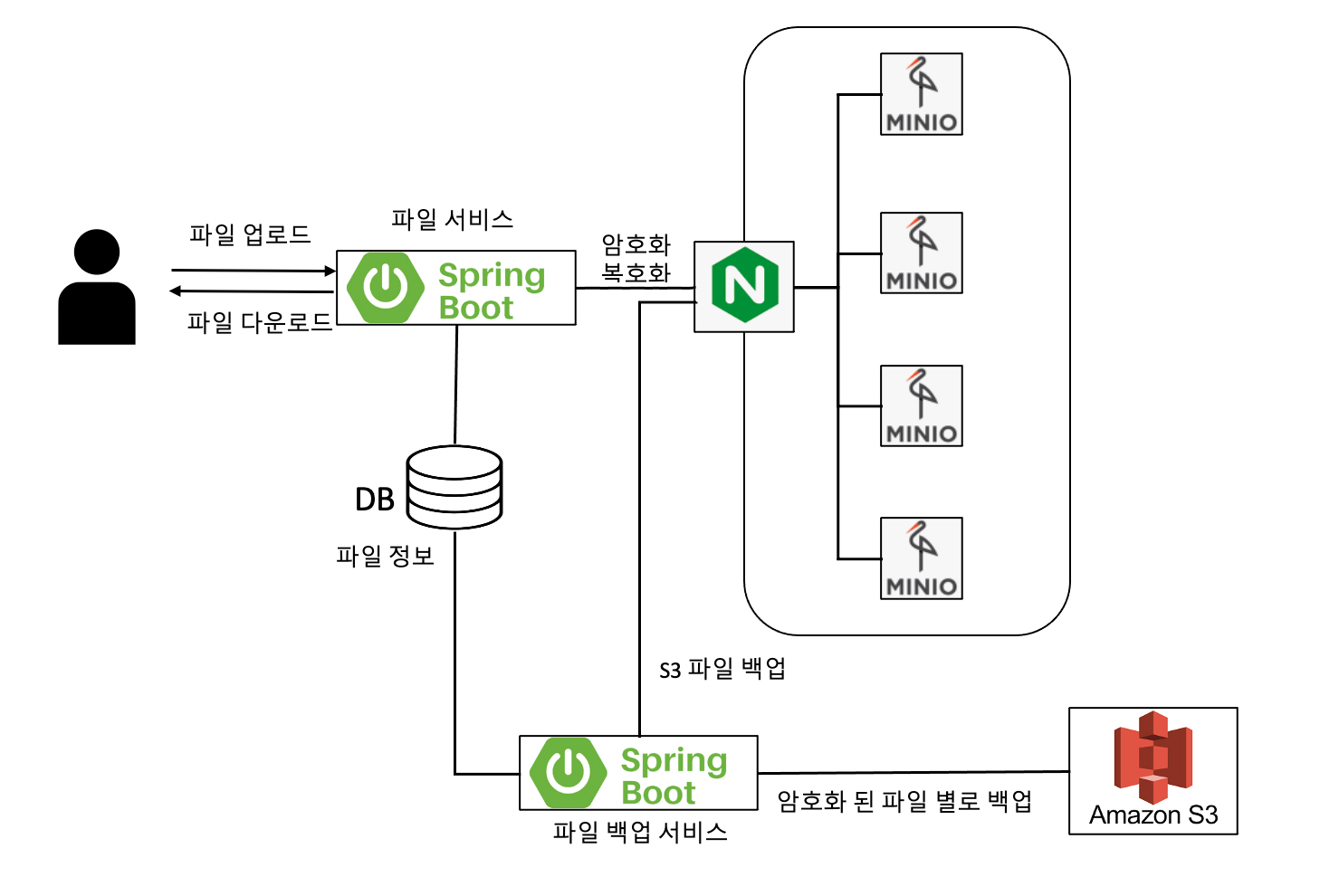
Uploading and Downloading Encrypted Files
I securely stored and encrypted the SecretKey using a file service. I configured it to be stored in MinIO.
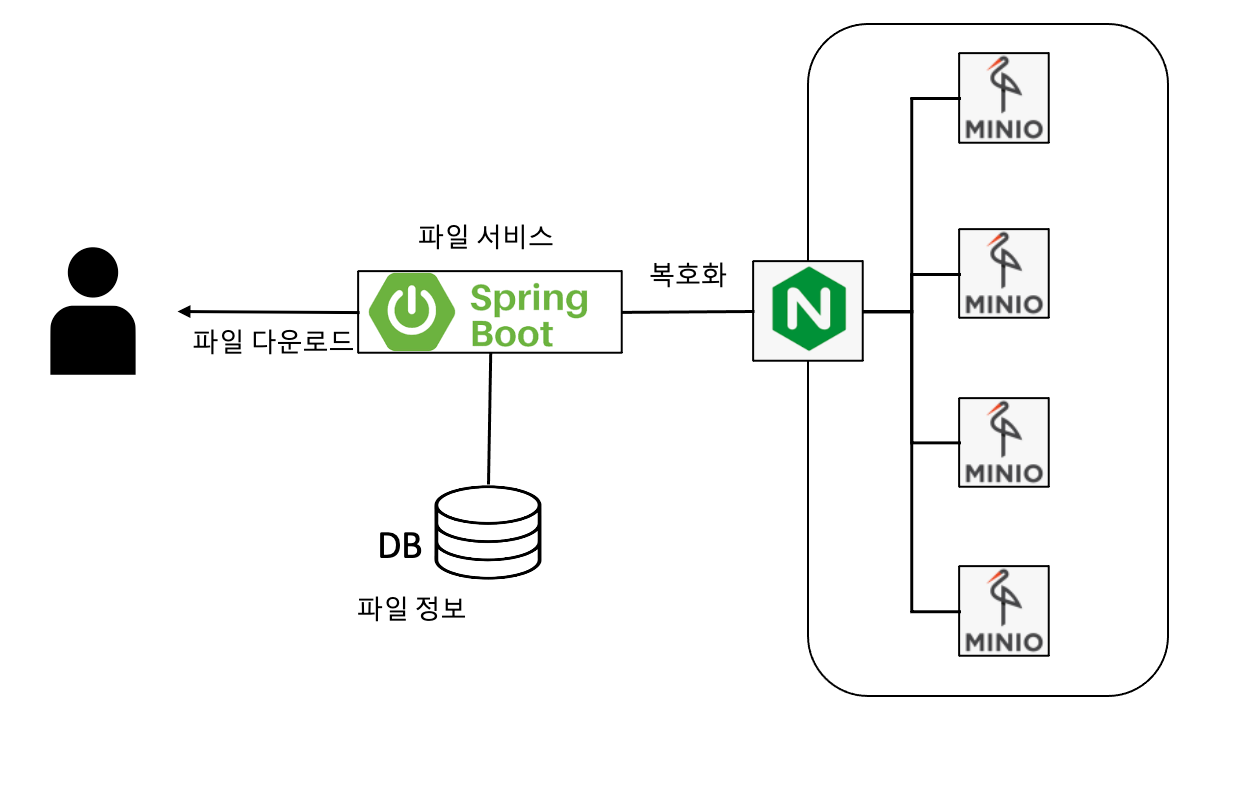
Backup Configuration
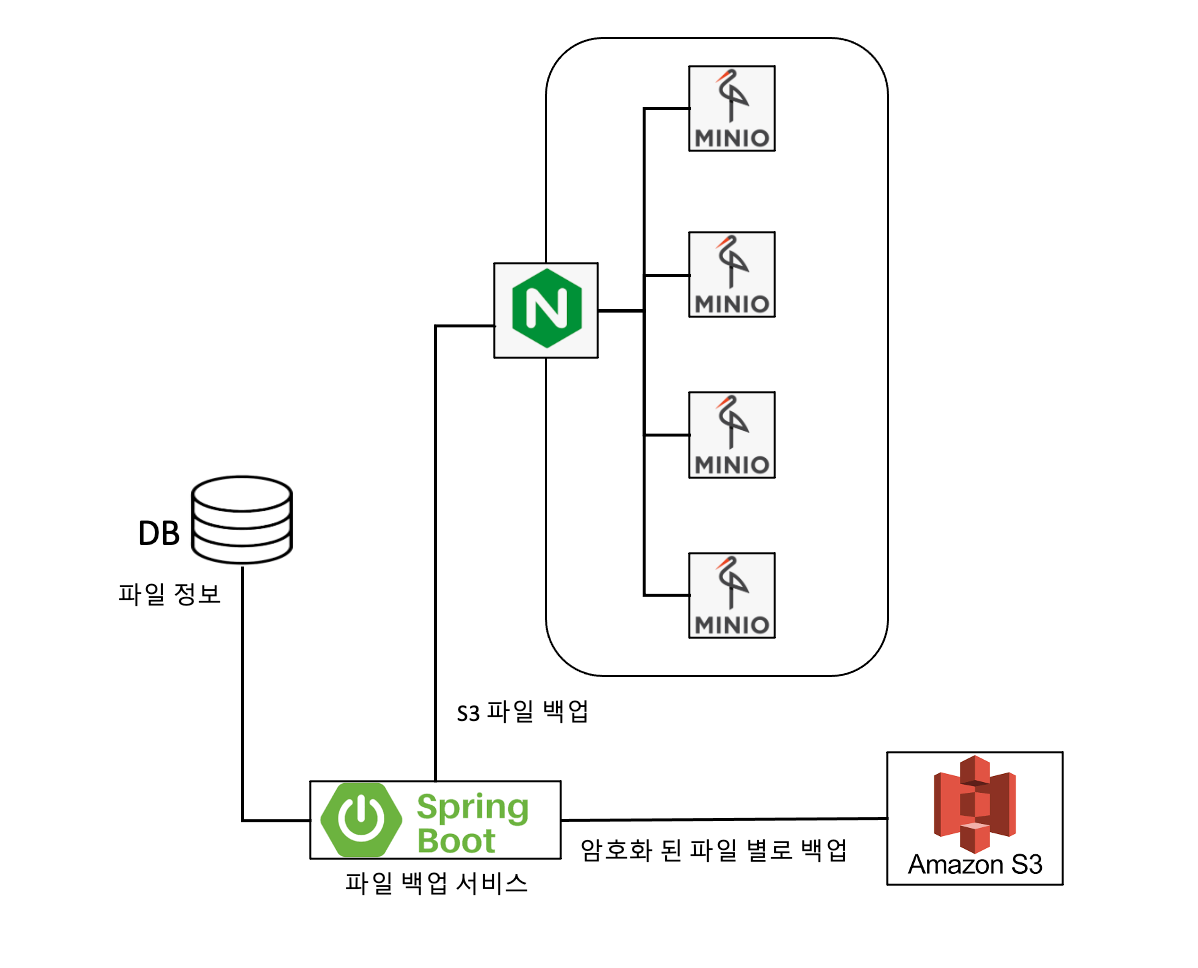
I created a "file backup service" to back up file services. I designed it to run periodically at specific times for backup purposes. I configured the system to store the encrypted backup data on AWS S3.
In closing
After building the file storage platform, we’ve expanded its use beyond funding to include our store and membership services. While it currently handles only basic functions, we plan to enhance it into a more robust file storage platform by adding features such as access logging—which allows us to view request logs for each service bucket—and the ability to configure access permissions by business unit.
I received a lot of help from my colleagues throughout the entire process—from design and development to the launch of the production environment. They also offered advice and encouragement on aspects I hadn’t considered. I think this is a great company for trying new things. I hope to continue gaining experience through many new endeavors and becomeWadiz who finds real fulfillment in my work 😉
Do you still have questions? 👀
See how developers work 👉 Click here
Curious about howWadiz project reviews are conducted? 👉 Click here